Choose this option to target audience segments based on past user location. These segments, managed by Foursquare, have a couple of unique characteristics that you should understand.
- All segments are based on historical data. Say, for instance, you want to target users who visited Walmart. That's possible, but you need to understand the data represents users who visited Walmart at some point in the past. If you want real-time geo data, customize POI settings on the Geographic targeting page.
- New data takes time to enter the Foursquare ecosystem. If, for instance, a user visited Walmart yesterday, that data point won't be added to the segment for a couple of weeks—maybe longer.
Opening the Location Audience page
Log in to illumin. Go to the top menu bar and select Library > Audiences. Click the New Audience button. A new window displays.
Select the Location Audience card and then click the Next button.
On the next page, select Behaviors to build an audience that visits Walmart (the example for this article). A new form displays. You can incorporate Geography and Demographics targeting options into the Foursquare design. Many of those settings can be customized on the canvas using illumin's Targeting filters.
Creating a design
Here's a piece of Foursquare jargon you should know: design. In the Foursquare universe, a design is a bundle of settings (e.g. place, date, filters, etc.) that together generate an estimated audience. You can save a design and then create another one. The result is a super-audience that you assemble by joining multiple designs with AND or OR conditions. The default condition is OR. FYI, Foursquare rejects small audiences (e.g. 10,000 devices or less) and really large audiences (e.g. the entire US population).
To create your first design:
- Make sure the Have been at tab is selected.
- Make sure the Places tab is selected. Enter a place name, like Walmart. In the below example, there are many Walmart variations, so I select the item that seems to capture all the elements (e.g. garden center, pharmacy, chains, categories, etc.).
- Select a pre-set rolling period (e.g. past month) or click from and create a custom period.
- The default setting is At Location, but you could configure a radius option and then enter a value (e.g. 500 meters).
- The graph indicates the estimated reach, which counts devices (not people).
Optionally, click the filter icon to customize the segment. Click the clock icon to filter based on time of day, day of week, or frequency. BTW, this feature is not available if you select a custom time period.
Once complete, go to the top of the page. Enter a Design Name and Targeting Code (if creative labelling is not your strong suit, enter the Design Name). Click the Add to Design button. The main page displays. It shows the segment you created but have not yet saved. At this point, you have two choices: create a new segment or click the easy-to-miss Save button and then Create Audience. I’ll add one more segment: visits to Walgreens.
I created a Walgreens segment by following the steps described above. The sidebar now shows two segments (Walgreens and Walmart) separated by an OR condition.
Changing conditions
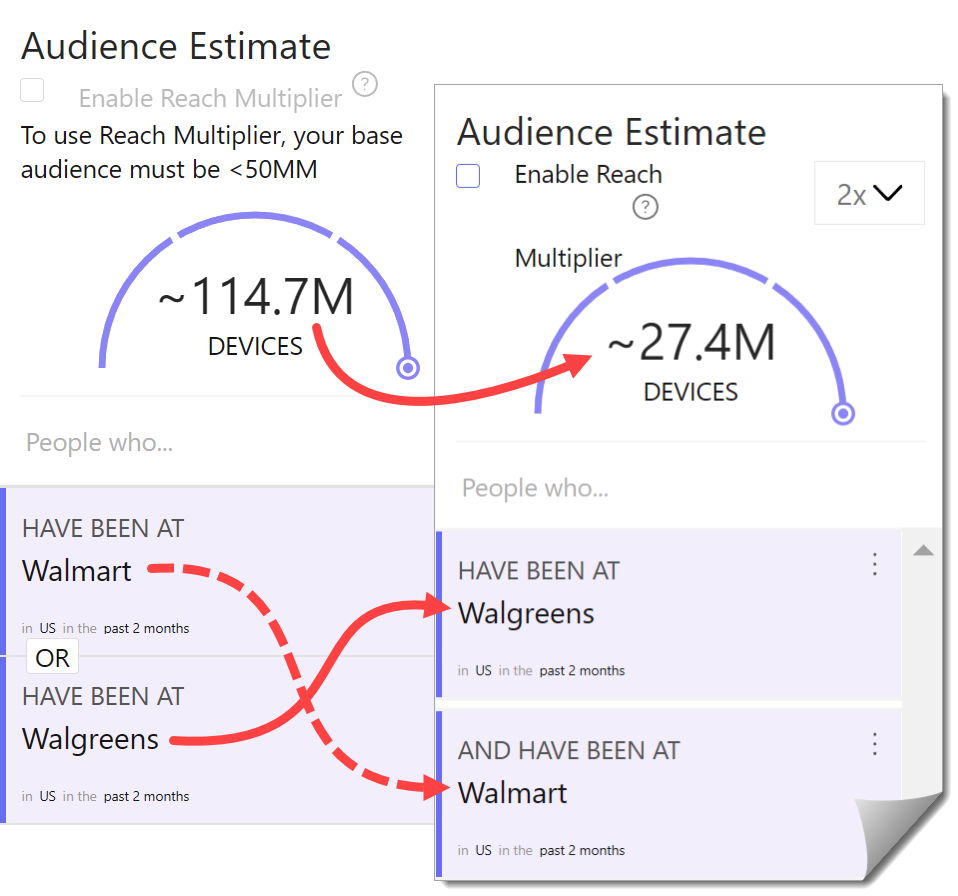
This audience size looks solid (around 114 million), but I'll make a small adjustment. I can change the condition from OR to AND. To swap conditions, click the bottom widget and drag it up and over the top widget. The word OR disappears, which means the condition is AND.
In the below screenshot, I dragged an audience up. Notice the word OR between the segments is gone? That means the assumed condition is AND (weird, right?). Also, note the estimated audience changed. Now, it’s about 27 million devices.
Saving an audience
So far, I’ve created one draft audience by adding two segments, but nothing has been saved to the library. If I leave the page now, all my work disappears. Before saving, you can tweak the audience by removing a segment from the list. That's optional.
Go to the side panel, click the three-dot icon, and select Delete. To save an audience to your library, click the Save button at the top of the page. Then click Create Audience near the bottom of the page.
illumin displays a confirmation popup. Click Got it. The workflow returns to the Creatives page and shows the new audience with a Processing status. It's not possible to edit a location audience when the status is processing.
Editing an audience
You can easily update a location audience by changing the segments. Go to the Audiences page, hover the mouse on a Location audience, and click the three-dot icon. Make changes to the design (e.g. Behaviors, Geography, or Demographics) as required and then click Add Design > Update audience. Foursquare requires up to 48 hours to process audience changes. You can add the audience to a journey, but the audience won't be active until the processing is completed.
FAQs
What is a Location Audience in illumin?
A Location Audience uses past visit data from Foursquare. It helps marketers target users based on places they visited at some point in the past. It works well when marketers need broad reach and clear intent signals based on real-world movement.
Does this feature use real-time geo data?
No, Foursquare data is historical. New visits take time to enter the system. If you need current location data, use the Geographic targeting page and set custom POI options.
What is a Foursquare design?
A design is a bundle of settings that defines one part of your audience. It includes the place, date range, radius rules, and filters. You can save several designs and join them with OR or AND to build a larger audience strategy.
Why do some designs fail to save?
Foursquare rejects segments that are too small or too broad. If the estimated reach is very low or resembles a national population, adjust your place choice, date settings, or filters.
How do I update a saved location audience?
Go to Audiences, open the item, and edit the segments. Change the behaviors, geography, or demographics as needed, then apply the update. The audience enters processing for up to 48 hours before it becomes active again.